
login to rate this
.NET BlogEngine 4.0 [non-official]
2 years ago
0
0
|
login to rate this
[.NET7] Design Patterns: Facade in a Web Application
2 years ago
8
0
|
login to rate this
[.NET7] Design Patterns: Repository in a Web Application
3 years ago
0
0
|
login to rate this
[.NET7] IP GeoLocation with Dependency Injection and Custom Middleware
3 years ago
0
0
|
login to rate this
[.NET7] Weather Forecast with Dependency Injection and Custom Middleware
3 years ago
0
0
|
login to rate this
2 ways for creating QR Code using ASP.NET
8 years ago
0
0
|
login to rate this
AMD Ryzen 9 home server with Fedora 41 and .NET 8
one year ago
31
1
|
login to rate this
ASP.NET MVC Routing with @
9 years ago
0
0
|
login to rate this
ASP.NET MVC Routing with Constraints
9 years ago
0
0
|
login to rate this
BlogEngine.NET 3.3.5 with a BBQ Sauce
4 years ago
0
0
|
login to rate this
BlogEngine.NET 3.3.5 with a BBQ Sauce: Part 2
4 years ago
0
0
|
login to rate this
EF7 on .NET Core 7 (Preview): Fedora 35 x Windows 11 (41 Million Rows)
4 years ago
1
0
|
login to rate this
Entity Framework Core 6: Fedora 35 x Windows 11 (41 Million Rows)
4 years ago
4
0
|
login to rate this
Entity Framework Core 7 (Preview): Fedora 35 x Windows 11 (41 Million Rows)
4 years ago
0
0
|
login to rate this
Entity Framework Providers for the .NET BlogEngine
4 years ago
0
0
|
login to rate this
Enum as String in EF Core
3 years ago
1
0
|
login to rate this
Facebook: Data Deletion Callback URL in C#
4 years ago
0
0
|
login to rate this
How to fix the Could not load file or assembly 'System.IO.Compression' or one of its dependencies exception
4 years ago
0
0
|
login to rate this
How to Recover Access to your Account in an ASP.NET Application using the Membership (without decrypting your password)
4 years ago
0
0
|
login to rate this
Installing and Configuring Jenkins with GIT to Build and Deploy Your .NET Application
3 years ago
0
0
|
login to rate this
Installing and Configuring Jenkins with SVN to Build and Deploy Your .NET Application
3 years ago
0
0
|
login to rate this
IP GeoLocation with Unity and Dependency Injection
4 years ago
0
0
|
login to rate this
NHibernate Providers for the .NET BlogEngine
4 years ago
0
0
|
login to rate this
No mercy for the ORMs: Load and Performance Test on EF Core, NHibernate and pure ADO.NET (41M rows)
4 years ago
0
0
|
login to rate this
Resizing images on a Controller Method in ASP.NET Core (.NET 6)
4 years ago
0
0
|
login to rate this
Streaming Video Files in ASP.NET MVC
4 years ago
0
0
|
login to rate this
Testing your MVC App on XSP/mono in Fedora (before deploying to Apache)
4 years ago
0
0
|
login to rate this
Weather with Unity and Dependency Injection
4 years ago
0
0
|
 nbolt
nbolt
Hi Folks! Keeping up with a series of added features to the BlogEngine.NET 3.3.5, this time I wanna show you the option to add a header image to posts, using the current CustomFields feature of the CMS (without adding new columns/members to the original classes).
If you haven't read the first post about it, please click in this link to see what I am talking about. Find the github repository here.
The reason behind the feature
Well, first is to make our blogs look cooler (by modifying some files from the admin section and 2 themes that come with the default 3.3.5 blogengine). And second, the main reason actually, is to improve user engagement to our blogs. Shared links with cool header images on social media, like Facebook and Google Plus, seems more attractive to click on than simple/plain text. A dedicated field for adding a header image will help us later create the meta information to complain with social media engines, rather than simply adding an image on top of post contents.
Download the branch called morefeatures in my github, open the solution on your Visual Studio and hit play. Access the admin pages and go to Content > Posts and edit the Welcome post. You will notice a new field called HEADER IMAGE with an icon, right below the Customize button, as shown below:
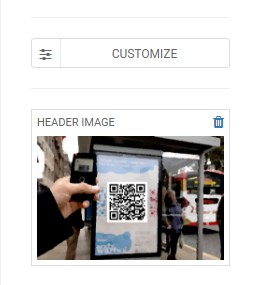
You can select/upload any image, leave it without one, but just make sure the selected image is large enough. If you have a uploaded image too large even for a header, you can always pick a size option (original, large, medium, small and thumbnail) so your post won't take too much time to be loaded in someone's browser.
Posts with this new feature will look like this (pictures taken from 2 basic themes, standard and standard 2015):
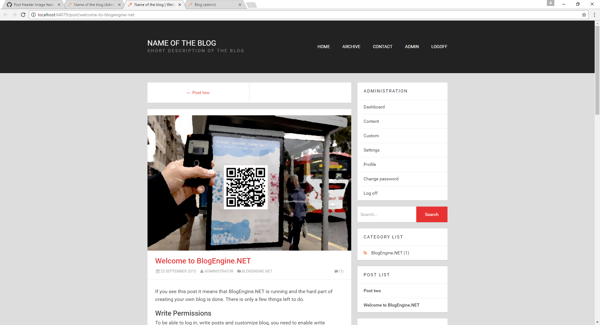
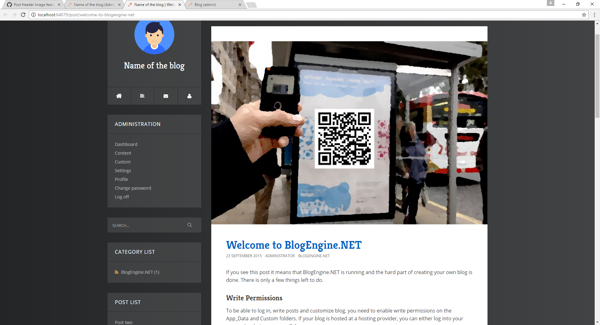
In case you have a different theme, please take a look @ PostView.ascx source-code from the themes mentioned above so you can modify yours as well.
By using this modified version of the blogengine 3.3.5, you will have to wait when a new official version comes out before updating it. If you do so from the dashboard, the files will be replaced and you will lose the cool features.
And this is it for now! Enjoy...
- nbolt
- nbolt
- nbolt
We use cookies and similar technologies to enhance your browsing experience, analyze site traffic, personalize content, and serve targeted advertisements. By continuing to use our site, you consent to our use of cookies. And click OK to close this pop-up window.